Zilnic oferim programe licențiate GRATUITE pe care altfel ar trebui să le cumpărați!
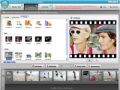
Giveaway of the day — Wondershare Photo Story Gold 3.4
Wondershare Photo Story Gold 3.4 a fost chilipirul zilei în 21 septembrie 2009

Wondershare Photo Story Gold 3.4 este un program software redutabil dar uşor de utilizat care vă ajută să creaţi un video cu prezentări de imagini pentru YouTube, iPhone, iPod şi alte dispositive portabile. Combină poze şi muzică cu stiluri atrăgătoare de film rezultând diferite formate video: MP4, AVI, WMV, 3GP, MPEG-2. Puteţi crea filme exceptionale pentru diverse ocazii: nuntă, onomastică, de familie, călătorii, etc.
- Transformă pozele şi muzica în prezentări de imagini video
- Stiluri predefinite de film combinate cu efecte multiple de trecere şi succedere a pozelor.
- Stiluri antrenante de film pentru nuntă, călătorii, onomastică...
- Puteţi adăuga un text personalizat pe poze
- Permite adăugarea de efecte şi retuşarea pozelor
- Permite diverse formate video: MP4, AVI, WMV, 3GP, MPEG-2
- Permite distribuirea prezentărilor pe YouTube, iPhone, iPod şi altele.
- Suport online prompt şi de îndredere
- Detalii mai multe
Cerinţe minime de sistem:
Windows 2000/XP/Vista
Publicist:
Wondershare SoftwarePagina de pornire:
http://www.ourpix.com/photo-story-gold.htmlDimensiunile fişierului:
26.6 MB
Preţ:
$29.95
Titluri promovate
Cel mai bun program sofware de creare a filmelor DVD din poze care vă permite să transformaţi poze şi muzică în filme sclipitoare cu sute de stiluri gratuite poză-în-poză. Format de ieşire pentru vizionare TV cât şi pentru diverse formate pentru YouTube şi dispozitive mobile. Ideal pentru toate ocaziile speciale precum o nuntă sau o vacanţă, etc. Vizionaţi exemple de video imagini şi găsiţi-vă inspiraţia!
Un program redutabil dar uşor de utilizat ce crează galerii flash permiţându-vă să transformaţi pozele statice în impresionante filme flash cu muzică pentru a împărtăşii momente speciale pe site-ul web. Cu mai bine de 60 de şabloane flash gratuite, peste 70 de efecte de trecere şi efecte de mişcare/focalizare, puteţi crea galerii interactive cu poze 3D, prezentări de imagini, albume foto online şi banere flash pentru MySpace, jurnal şi site web fără nici un fel de cunoştinţe de flash sau programare. 50% reducere doar astăzi pentru utilizatorii Give Away of The Day!
GIVEAWAY download basket




Comentarii la Wondershare Photo Story Gold 3.4
Please add a comment explaining the reason behind your vote.

The Good
* Straightforward and fairly easy to use.
* Supports (at least) .JPG, .PNG. and .BMP images.
* You can add audio/sound (at least .MP3, .WMA, .WAV) to your images before turning them into movies.
* You can output as .MP4, .AVI, .WMV, .3GP, and .MPG (MPEG-2).
* Has various different output "profiles" for electronic devices such as iPod, iPhone, Zen player, Zune, etc.
* You can make basic edits to images from within the program such as crop, rotate, add text, etc.
* You can trim audio files you add from within the program.
* Comes with quite a few "styles" (pre-set photo transition times, effects, and other eye candy related to how your output video will look).
* You can download many, many extra free "styles".
* You can use multiple different "styles" for one video.
* You can preview what your output video will look like before you create it.
The Bad
* Developer not very clear on which photo and audio formats are supported.
* Doesn't support .GIF images.
* Doesn't support .OGG or .AAC audio formats.
* Lacking support to output as .FLV video.
* No way to modify "style" settings such as photo transition times.
* Each "style" has a defined limit on the max/min photos allowed.
* Program window is not resizeable (only fully maximize or default size).
* Can be a little bit slow in creating videos.
Free alternatives
Microsoft Photo Story 3
For final verdict, recommdenations, and full review please click here.

Installation Guide
1. Unzip the package you've downloaded in GAOTD;
2. Run the activation program Activate.exe in the package AT FIRST;
3. THEN run Setup.exe in the package to install the software.
P.S.: Vista users can follow the above steps to register the program as well, but it is recommended to run the program under administrator account.
Wondershare provides free online support for this giveaway. If you have questions about Photo Story Gold, please feel free to contact our technical support directly at Wondershare Support Center or Email us at: support_pt@wondershare.com
Wondershare has also released exclusive discounts only for GAOTD users today.
Get More info and Enjoy 50% Off Special Offer ONLY for GAOTD Users
Vista already has built in software that does this.
Windows XP has a free download Microsoft Photo Story.
Picassa also does the same thing.
Many CD burning programs also offer this feature.
A while ago I installed Wondershare's Photo Story Gold from GOTD... The file: "PhotoStory.exe" is version 3, dated 7/17/08 -- today it's version 3.4.2.0 . Using the app I didn't see any big difference, but in the program's Plugins folder there are additional encoding files from top tier company MainConcept [MainConcept encoders are used by *Very* expensive video apps from Adobe & Sony]. There's also a new folder called: "DecPlugins", with 33 files. An obvious guess, without a changelog, would be better decoding on import, better encoding of your finished project. Installing today's GOTD in a separate folder, the older version seems to work fine, but they both use some .ax files with the same names, & these are different -- since these .ax files are registered with Windows, running the older version will use the newer files. SO that's a big "Remove the prior version" peace of advice...
Photostory Gold works in a 3 step process... 1) you import your photos using the built-in explorer, optionally importing an audio track at the same time, using a button on the lower 1/3 of the window. 2) you click the Style button up top, bringing up 3 tabs with different transitions [use these between photos] you drag/drop on each photo. 3) Click the Create button, where you can preview your slide show, & encode to mp4, avi, wmv, 3gp, & mpg2. You can also do some minimal editing of your photos & audio track, mainly for length or timing -- I'd recommend having your photos in good shape first, using a regular image editor where you have many more capabilities.
Installation isn't bad, but it threw me for a loop when McAfee went after a few *Totally Unrelated* files during install -- for me a good reminder that coincidence does happen. Everything but the Start Menu shortcuts goes in the program folder with 346 files, 23 folders taking up ~94 MB. Photostory Gold's install doesn't trash the registry, & Activate.exe inserts the key.
As far as ratings go, if I was recommending slide-show software to a casual user /novice, this would be at or near the top of the short list. If the goal was to create Video DVDs with your slide-show(s), I'd suggest doing it in DVD Authoring software, where chances are they'll force you to obey the rules -- there are both tricks & limits that can take quite some time to learn, so software that forces you while doing it auto-magically is a big time saver. That said, the free DVD slideshow GUI you can pick up via videohelp.com seems Very popular. If you're after great transition FX, & loads of them, most Non Linear video Editors [NLE] -- even the lower end versions -- are usually jam packed... it doesn't take a ton of time for them to code, & they sell thousands & thousands of copies as soon as a novice get's a look at them. Caution, unless it comes with DVD software, putting your one-of-a-kind slide-show on DVD is *your* problem. [Note: a good DVD slide-show has buttons for manual controls -- won't get those by dragging/dropping your video into the app.]
Finally, If you want to watch your slide-show on a regular TV, Be very careful about aspect ratios. Your software *should* do any re-sizing for you, but not always, & not always correctly. Without some sort of resizing, photos on a DVD will either look too wide or too narrow, depending on PAL or NTSC std.s, *because of the DVD player*. They'll look too wide or narrow depending on your PC's video player, & whether it stretches height to balance or not.
Simple steps to make photo video slideshow with Photo Story Gold:
Step 1: Install software and add photos and music in "Photo Set" Tab;
Step 2: Select movie styles for photos in "Style" Tab;
Step 3: Convert photos to video slideshow in "Create" Tab.
For detailed tutorial please see how to make YouTube video slideshow
Ofertele iPhone de astăzi »





Ofertele Android de astăzi »





Softul e bun,dar mi se pare ca nu merge 100% cum scrie in promo
Save | Cancel
Alternativa free este PhotoStory 3 for Windows.
Save | Cancel