Zilnic oferim programe licențiate GRATUITE pe care altfel ar trebui să le cumpărați!
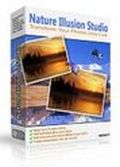
Giveaway of the day — Nature Illusion Studio Standard Edition
Nature Illusion Studio Standard Edition a fost chilipirul zilei în 6 august 2010

Transformați-vă pozele din lumea reală într-o scenă animată din natură prin adăugarea unei multitudini de efecte ca ploie, efecte de vreme și sunet pozelor dvs. Toate efectele au fost recreate cu acurateţe, astfel ca undele apei sau adierea uşoară a vântului vor arăta exact ca în realitate.
Rezultatul final va fi unul superb şi o atmosferă minunată care poate fi salvată ca screensaver, un executabil de sine stătător, în format AVI sau ca fişier GIF şi deci poate fi distribuit altor persoane care vă vor admira creaţia.
Trăsături cheie:
- Aplicaţi până la 6 tipuri de efecte de apă unei singure imagini
- Puteţi adăuga ninsoare sau ploaie
- Adăugaţi efecte de sunet de până la 8 canale
- O bibliotecă de presetări de apă pentru diverse efecte, inclusiv cascadă, lac, râu, foc, ceaţă, etc.
- Salvaţi creaţia ca screensaver, fişier executabil, în format GIF sau fişier AVI
Ofertă specială pentru utilizatorii GOTD:
Cumpăraţi acum Nature Illusion Studio Professional Edition pentru doar 15USD (preţul normal este de 39.95USD). Ediţia profesională vă permite să adăugaţi obiecte animate şi fundal sonor. Mai mult, veţi primi cadou actualizări gratuite pe viaţă pentru orice versiune nouă a Nature Illusion Studio. Click pentru a cumpăra Ediţia Profesională.
Cerinţe minime de sistem:
Windows 2000/ XP/ Vista(x32 and x64)/ 7 (x32 and x64)
Publicist:
NufsoftPagina de pornire:
http://www.nufsoft.com/nature_studio.phpDimensiunile fişierului:
6.48 MB
Preţ:
$24.95
Titluri promovate
Creaţi screensavere profesionale pentru uz personal sau comercial cu suport de distribuire şi caracteristici promoţionale. Ofertă specială (reducere 50%): Cumpăraţi pachetul ce include Ace Pro Screensaver Creator , Nature Illusion Studio şi Nature Illusion Screensaver pentru doar 39.5USD. Click aici pentru a-l achiziţiona.
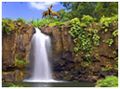
Priviţi si bucuraţi-vă de screeensaverul nostru de calitate cu imagini din natură, oferindu-vă cele mai minunate locuri de pe pământ printre care cascade, lacuri, plaje, păduri şi sute de alte imagini din galeria noastră gratuită. Ofertă specială (reducere 50%): Cumpăraţi Illusion Screensaver pentru doar 10USD. Click aici pentru a-l achiziţiona.
Ofertele iPhone de astăzi »





Ofertele Android de astăzi »





Comentarii la Nature Illusion Studio Standard Edition
Please add a comment explaining the reason behind your vote.
The Good
* Straightforward and easy to use.
* Allows users to add water, snow, and rain effects.
* Effects can be custom modified to change their parameters.
* Allows users to output animated scenes as screensavers, EXE Flash files, AVI videos, or animated GIFs.
The Bad
* Lacks in diversity of animated effects - need more than just water/rain/snow effects.
* Only allows users to animate JPEG/JPG and BMP images - does not support PNG or GIF.
* Only supports AVI format for output as video; lacks support for other popular format such as FLV or MP4.
* Uses non-standard hotkey for "Undo" (Shift + Ctrl + Z instead of Ctrl + Y).
* Incites users to download another program (Nature Illusion Screensaver) without clearly mentioning in the program that it costs $19.95
* Has the EULA automatically checked for acceptance. Users must opt-out of the EULA instead of the customary opt-in.
For final verdict, recommendations, and full review please click here.
Save | Cancel
@TK: Ashraf means that only JPEG/JPG and BMP can be used as starting images. The "Build GIF" button is for exporting the image as a GIF
Save | Cancel
Smooth download/installation/activation on Vista x32. GUI is simple to navigate and program is easy to use - I produced a good-quality, realistic animated photo in about 1 minute. True, the program is way too overpriced (at $24.95) given its limited choices/effects - but for photo-editing enthusiasts like me, it's well worth downloading the program and adding it to my photo-editing arsenal tool - and it's free for today, so it's definitely worth taking advantage of while we can. Thanks, GOTD and Nufsoft.
Freeware Options:
Sqirlz Water Reflections (Water, Snow, Rain Effects) - CNET User Rating 4/5
Professor Franklin Instant Photo Effects (Frames, Objects, Textures, etc.) - CNET User Rating 4/5
Save | Cancel
Normally, I don't speak out about the non-review, but I have to say some things today. Corner-A ArtStudio is generally more versatile and sophisticated, but this isn't bad. The "water" effect actually covers a lot of things, as documented in the Help file (and presets for non-water effects are included). I used it to animate some leaves. Some ArtStudio effects can be achieved via NIS parameters, unlike what's said in the non-review. The non-review meant to say "Redo", and it's no big deal, as Shift is the standard "opposite" modifier. Normally, one isn't going to animate a PNG, you can easily convert it, and GIF is only used for animated images (nobody in their right mind uses the obsolete GIF for anything else). AVI is a container format, and NIS does allow use of other installed codecs, but you have to be aware of codec issues on other PC's, as documented. I did generate an MP4 AVI. It makes more sense to use a converter to handle the plethora of available formats, if one so chooses.
You can see some of the Professional effects in the preview, such as animated images. Navigate to your Documents\Nufsoft folder when adding animated images for preview purposes.
There are various silly bugs. A cosmetic but annoying bug in one of the dialog box types, where a label was repeated over another control, making it very hard to read. When set to open the output video after creation, it didn't.
#2, Adamus, standard scroll bars are present, as well as a Navigator in the lower-left corner, clearly visible and documented.
Actually use the program and read the Help before making comments.
Save | Cancel
#10: "How do you register the program? I cannot get rid of the water marks"
There is no key to copy or activation etc -- About box shows registered to Default. Licenses are added however to the registry under HKLM, which can be restricted, especially in Vista/7... did you try running the setup file ["NatureIllusionStudioStandardEdition.exe"] as Admin?
* * *
#25: "...posting the first comment one minute after GOTD released it... Incidentally, ashrafs comments are always based only on the trial versions..."
IMHO a good reminder...
Both Ashraf & Stephan/Whiterabbit [Game GOTD] spend the wee hours (when I for one am thankfully in bed) posting reviews 1st thing to help out that day's GOTD visitors. I try to always remember that. Yes, to do that they might have to use trial versions, & sometimes those trials don't correspond 100% with what's on GOTD, but it's that or neglect the 1st downloader's, which I think most feel is a worthwhile trade-off. Comments are added & read throughout the day, so if there's something they got wrong or some disagree with, GOTD visitors have that info too, & can decide for themselves. Personally I value all the different opinions & read them.
Save | Cancel