Zilnic oferim programe licențiate GRATUITE pe care altfel ar trebui să le cumpărați!
Giveaway of the day — CutOut 5 Standard
CutOut 5 Standard a fost chilipirul zilei în 23 martie 2018



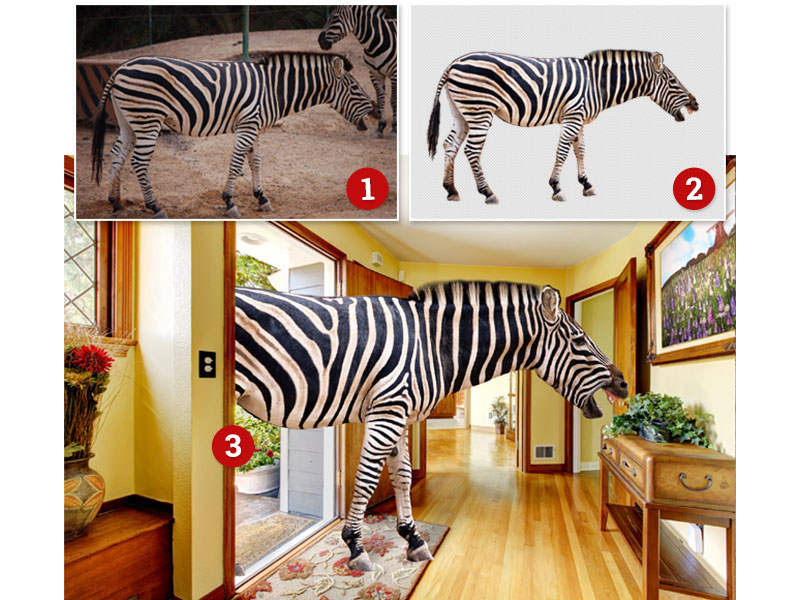
DECUPAJ 5 vă permite să taie cele mai fine detalii și obiecte transparente, la un clic pe un mouse-ul. Chiar dacă fundalul este complex, DECUPAJ 5 poate elimina obiectele de care aveți nevoie datorită perfect margine de recunoaștere și în interiorul/în afara rogojini.
Utilizarea chroma keying pentru a lucra la un nivel profesional: alege culoarea de fundal și taie obiect pe un fundal monocrom cu un singur click de mouse. Datorită instrumente, cum ar fi inteligent gumă de șters și de eroare perie, veți găsi întotdeauna instrumentul potrivit pentru a retușa imagini ca un profesionist. Soft focus funcție vă permite să reduceți claritate în fundal și de a produce portrete frumoase cu soft bokeh.
The current text is the result of machine translation. You can help us improve it.
Cerinţe minime de sistem:
Minimum: Windows 10/ 8.1/ 8/ 7/ Vista (x32/x64), Dual Core Processor, 2 GB RAM, 2 GB HDD, Screen Resolution, 1280 x 1024 Pixels, Graphic Card: DirectX-8-compatible, 128 MB, 32 bit color depth
Publicist:
FRANZIS Verlag GmbHPagina de pornire:
https://www.projects-software.com/cutout5-standardDimensiunile fişierului:
61.5 MB
Preţ:
$69.00
Ofertele iPhone de astăzi »





Ofertele Android de astăzi »





Comentarii la CutOut 5 Standard
Please add a comment explaining the reason behind your vote.
It’s a good programme but it is not as simple to use as its website suggests. If you look at the example on the Franzis site of a young boy seated on a couch next to a man (who, one hopes, is not a stranger recently met) you will notice that once they have been transferred to a bench at a lakeside the man has lost his right arm which he previously had placed behind the boy’s back. Clearly one has to be mistrustful of any programme that offers to do your thinking for you. Having said that, this programme can be very helpful when creating collages, greeting cards and, apparently, advertisements for artificial prostheses.
The registration was easy but one has to be aware that the bottom of the registration page is usually not visible unless you scroll down. This contains the missing fields you need to fill in to register. Perhaps if you scroll down further you will find the man’s missing arm. I bring this up again because this sort of inattention to detail does not reflect well on the publisher nor his or her product. What does reflect better are the introductory tutorials on the Franzis site which are short and to the point.
A further point: It seems to me that at least two thirds of the comments almost everyday are about difficulties in registering software. These usually can be solved by reading the readme file. It doesn’t take much effort even if you have to move your lips as you read. When you subtract the indignant comments about divulging email addresses and anxieties about the perils of becoming the reluctant recipient of unwanted email there is not much edification available to anyone who wants to know about the software on offer. Perhaps one could take an example from a recent prominent stable genius and build a wall (in this case virtual) to separate comments about registration problems from those of a more substantive character.
Save | Cancel
I use PhotoShop and so it's relatively easy for me to make cut outs like this. However, after having ran this program a couple of times it does a great job, especially for those who don't own PhotoShop or know how to use it. It's not going to give you high end results because the sharp edges will give it away as a cut and paste, but it'll do for simple, quick projects.
Registrations was, for me, a simple process because I followed the instructions exactly. Email confirmation took a couple of minutes. All in all a smooth installation and registration process, and this program is a keeper.
Save | Cancel
I did my due diligence, watched a tutorial, read all the comments, and decided to add this program to my arsenal (I've been a pro photographer for 30 years and use Photoshop daily). When they refused to let me have it without me agreeing to receive all their promo emails in the future I deleted the download. Too much baggage for a program so light. Pro version is $89! You can purchase a COMPLETE pro photography program to rival Photoshop itself for only $79! Deleted. Where do I go to get my half hour back?
Save | Cancel
Gupstock,
You don't have a junk mail email address you use for all those "must receive promo" requirements? I have had a yahoo address that is nothing but spam for more than a decade now, it isn't rocket science if you think a tiny bit outside the box.
Save | Cancel
If you do image editing, today's GOTD, CutOut 5 Standard is generally worth adding to your toolkit. Franzis products I've gotten via giveaways & bought tend to have a very low impact on Windows itself, and don't have a large disk footprint -- Cut Out 4 for example, that I got via a giveaway in June, 2017, takes up ~7 MB.
How much you might use Franzis CutOut -- any version -- depends on what type of work you do with images, and what other software you're using. Selecting parts of an image is critical for the majority of more serious editing, But, making highly accurate difficult selections -- which is CutOut's forte -- is for the most part only involved with some types of projects, generally when/where you're replacing the subject's background, or perhaps changing the color of a person's hair or garments.
Making those difficult selections without some sort of software automated assistance requires some skill, very often hardware in the form of a graphics pen & tablet [or a tablet that can use a pen], and can be both tedious & time consuming. For the last 10, 12 years or so, companies selling editing software have been coming up with ways to make that quicker & easier -- in the quest to make software assisted selections more accurate, companies like Adobe have turned to AI. So whether Franzis CutOut might do better, or be faster for the majority of your work, depends on the software you're already using. The only way to tell for sure is to try it and compare. Do be aware that no software is perfectly accurate 100% of the time, and no matter what you use, there will be occasions where you have to do some added work, fine tuning the selection. Don't expect more than any software can deliver.
The comparison for CutOut 5 Standard vs. their other versions is here:
projects-software[.]com/cutout-comparison-table
The software's manual can be found as a PDF here:
transfer[.]franzis[.]de/support/70411-CutOut-5_standard-manual.pdf
Sale pricing for Franzis software can sometimes be found at Ashampoo, & Franzis will sometimes offer sale pricing in emails -- as with many software companies, the amount of the discount tends to increase the longer a product version has been available. And sometimes Franzis may offer very attractive upgrade pricing.
Save | Cancel
Downloaded and started to install but developer wants email, name & address. Aborted installation as I refuse to give out personal details so that they can be sold on by an unknown company to third parties.
Save | Cancel
Sorry, my bad I didn't read the registration page properly. You do NOT have to supply these details, I'm doing the developer an injustice. Did install and register without any issues, quick test proved to be good.
Save | Cancel